A DaisyDisk alternative with Finder-like columns
Keep DaisyDisk if you want its interactive sunburst map, broader advertised disk coverage, administrator scan, snapshot tools, support for older Macs, or lower price. Try SimplyDiskSweeper when you want a folder you choose shown as ranked Finder-like columns, then a confirmed move to Trash for the items you select.
I make SimplyDiskSweeper. DaisyDisk currently costs less and does several jobs SimplyDiskSweeper does not do. I compare the workflow and keep those advantages visible.
DaisyDisk and SimplyDiskSweeper facts and US prices were verified August 1, 2026 from their current first-party product pages and Apple listings.
DaisyDisk and SimplyDiskSweeper answer the same question differently
| Decision | DaisyDisk | SimplyDiskSweeper 0.16.0 |
|---|---|---|
| Main view | Interactive sunburst map with visual drill-down | Finder-like columns ranked by allocated space |
| Starting scope | Supported local, external, network, and cloud disks; current product also advertises administrator scanning and snapshot management | One folder or location the user chooses; results cover accessible entries in that scope |
| Inspection | Visual slices, drill-down, Quick Look, and a collector for items being considered | Hierarchical columns, keyboard navigation, per-column filtering, Open, Quick Look, and multi-selection |
| Removal | User decides what enters the collector and what is deleted | Selected items move to macOS Trash after confirmation; failed outcomes remain visible |
| US price | US$9.99 paid once | US$14.99 paid once on the Mac App Store |
| macOS support | macOS 10.13+, Intel and Apple silicon | macOS 15+ |
| Distribution | Direct download and Mac App Store | Mac App Store |
Both apps leave the important decision with the user. A large file is not automatically unnecessary, and its displayed size is not a guaranteed amount of reclaimable space.
Choose DaisyDisk for a visual disk map
DaisyDisk’s sunburst is the product. The current app scans a source, draws an interactive map, lets me drill into folders, previews files with Quick Look, and gathers candidates for removal. Large areas are easy to spot without reading a long size-sorted list.
The current product advertises more scan surfaces than SimplyDiskSweeper: local and external drives, network storage, Dropbox, Google Drive, OneDrive, and Box. It also advertises administrator scanning for restricted locations and management of macOS snapshots. Those features matter when my question is broader than one folder I can already select and access.
DaisyDisk currently costs US$9.99 paid once. Its direct license covers up to five personal Macs, includes minor updates and bug fixes, and supports macOS 10.13 or newer on Intel and Apple silicon. DaisyDisk also says it does not collect, transmit, or track user data.
I would choose DaisyDisk when any of these are required:
- an interactive visual map rather than a list or column hierarchy;
- support for a Mac that cannot run macOS 15;
- the lower one-time price;
- supported cloud-disk connections, administrator scanning, or snapshot management;
- a direct-download license that covers several personal Macs.
SimplyDiskSweeper does not claim parity with those features.
DaisyDisk covers more starting locations
The starting point changes the rest of the job. DaisyDisk presents mounted sources before I commit to one folder. Its current feature list includes internal and external disks, network storage, and supported cloud services. The direct edition can use administrator scanning to show restricted folders, and the product includes a separate snapshot-management workflow.
SimplyDiskSweeper asks me to choose the scope. The Mac App Store sandbox grants access to that selected location, then the app measures entries it can read below it. If an entry is inaccessible, that space is outside the result. This works well when I already know which home folder, project folder, Downloads folder, or external location needs inspection. It is a poor substitute when I need DaisyDisk’s broader overview or snapshot tools.
DaisyDisk has the lower price and wider macOS range
DaisyDisk’s current US$9.99 offer is US$5 less than SimplyDiskSweeper. The direct DaisyDisk license also covers up to five personal Macs. SimplyDiskSweeper’s US$14.99 Mac App Store purchase follows the Apple account and store rules instead of providing a separate direct license.
Platform support also favors DaisyDisk. Its current requirement starts at macOS 10.13, while SimplyDiskSweeper 0.16.0 starts at macOS 15. A Mac on Ventura, Monterey, Big Sur, Catalina, Mojave, or High Sierra cannot run the current SimplyDiskSweeper listing. DaisyDisk is the supported choice between these two on those systems.
Choose SimplyDiskSweeper for ranked Finder-like columns
SimplyDiskSweeper starts with a folder I choose and shows its accessible contents in columns. Each column puts the largest allocated sizes first. I can move across the hierarchy with the keyboard, filter the current column by name, preview or open an item, and select several entries in one column.
Removal is explicit. SimplyDiskSweeper shows a confirmation before moving the selected items to macOS Trash, reports the outcome, and keeps failed items available for inspection. It does not classify a file as junk or promise that a displayed number will become free space.
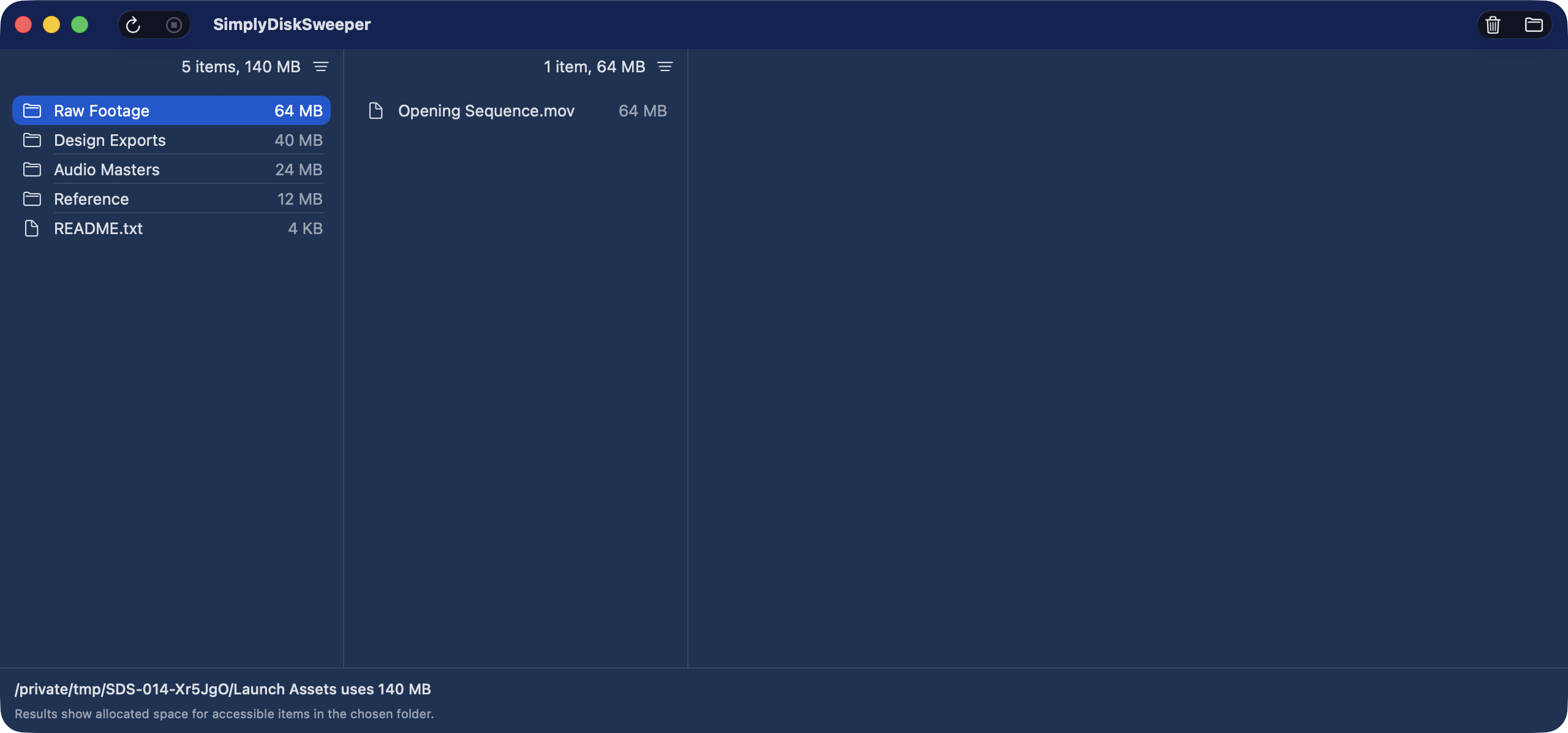
The narrower scope is a real limit. SimplyDiskSweeper does not reconcile APFS snapshots, purgeable or free space, cloud-account totals, unique physical blocks, or macOS System Data. It does not request administrator scanning. Inaccessible entries are outside the reported accessible allocated-space total.
I would choose SimplyDiskSweeper when all of these are more useful than DaisyDisk’s visual and coverage features:
- a Finder-like column browser feels faster to read than a sunburst;
- the job begins with a folder I can choose;
- per-column filtering, keyboard navigation, and multi-selection fit the cleanup;
- I prefer Mac App Store distribution and sandboxed user-selected access;
- I want selected items moved to Trash only after a confirmation.
SimplyDiskSweeper currently costs US$14.99, so it is not the cheaper DaisyDisk alternative.
Columns keep file names and parents in view
The column layout is useful when I reason about a file by its path. Opening a folder adds the next column while the parent columns stay visible. The size sort tells me where to start, and the name filter narrows one column without turning the result into a separate search screen.
That layout gives up DaisyDisk’s whole-map pattern recognition. I cannot glance at a ring and see several large branches together. In return, I keep file names, parent folders, and the navigation path visible while moving through the hierarchy. The right choice depends on whether I understand storage faster as a map or as a path.
Trash is a recovery step, not a safety claim
SimplyDiskSweeper moves selected items to macOS Trash after confirmation. If an operation fails, the app reports the outcome and keeps failed items available. This is different from claiming that every selected file is disposable or that the displayed bytes will become available.
Trash gives me a chance to inspect or restore an item before I empty it. The chance ends after Trash is emptied, and some volumes or managed locations can have different behavior. I still check the file, its owner, and my backup before confirming.
Neither app can decide what I should delete
DaisyDisk says system files are safeguarded and the user decides what to remove. SimplyDiskSweeper limits its statement further: it shows allocated space for accessible entries and does not decide what is safe to delete.
I still inspect the item and its recovery path. Downloads, old disk images, replaceable installers, exported videos, and archives I created are easier first candidates. App support data, virtual machines, photo libraries, cloud-managed folders, and anything under a system location need more care.
Moving an item to Trash helps with accidental selection, but Trash is not a backup. Emptying Trash removes that recovery step.
Other Mac disk space analyzers may fit better
SimplyDiskSweeper is not the only non-DaisyDisk choice. OmniDiskSweeper is free and uses largest-first nested columns. GrandPerspective is an open-source treemap, free from SourceForge or US$2.99 from the Mac App Store.
The Mac disk space analyzer comparison puts those four workflows in one table. Choose OmniDiskSweeper when free ranked columns are enough. Choose GrandPerspective when a configurable open-source treemap is the better fit.
Primary DaisyDisk sources
- DaisyDisk product, pricing, requirements, features, and privacy
- DaisyDisk US Mac App Store listing
- DaisyDisk user guide
Primary SimplyDiskSweeper sources
If the ranked column workflow matches how you inspect a folder, see SimplyDiskSweeper’s current screen and Trash demo. It costs US$14.99 upfront on the Mac App Store.