A regex101 alternative for testing Swift Regex on a Mac
Keep regex101 when you need its browser-based explanations, debugger, unit tests, sharing, or documented range of regex flavors. Try Regex when the pattern is for Swift Regex and you want to test it in a Mac app that does not upload the pattern or test data.
I make Regex for macOS. I am comparing the workflows each product owns, not claiming that Regex matches regex101’s flavor coverage, learning tools, debugger, code generator, community patterns, or sharing.
regex101 workflow, engine, account, network, privacy, and pricing facts were verified August 1, 2026, from the public editor, capabilities documentation, FAQ, Pro page, and privacy policy. Regex facts were verified against the public 2.4.2 release and current US Mac App Store listing on the same date.
Choose the engine and the final destination first
regex101 is a broad browser workbench. Its current documentation lists PCRE2, PCRE, Python, ECMAScript/JavaScript, Rust, Go, .NET, and Java. The editor adds an automatic explanation, detailed match information, substitution and list modes, unit tests, a debugger, code generation, match export, benchmarking, formatting, saved links, and community patterns.
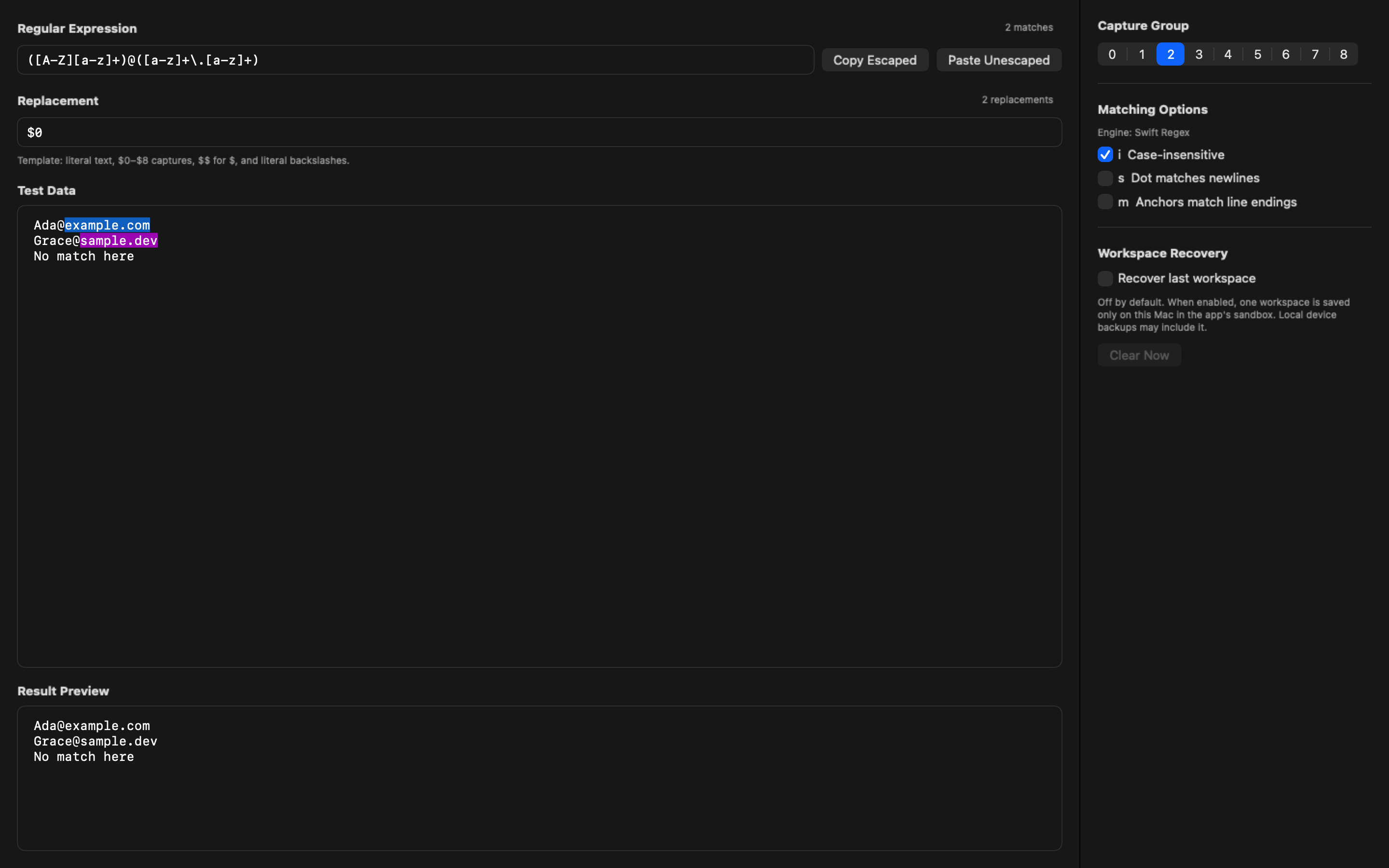
Regex tests only Swift Regex. It shows matches and errors live, separates empty, invalid, zero-match, and matching states, exposes captures 0–8, and supports the i, s, and m matching options. Its replacement result is a read-only preview using $0–$8 and $$; Test Data does not change.
| Workflow question | regex101 | Regex 2.4.2 |
|---|---|---|
| Which engines does it cover? | The current docs list PCRE2, PCRE, Python, JavaScript, Rust, Go, .NET, and Java | Swift Regex only |
| Where do I use it? | In a browser; the FAQ says the editor can run offline after its initial service-worker load | A native app on macOS 14.2 or later |
| What helps me understand a pattern? | Automatic explanation, match details, reference material, debugger, unit tests, and community patterns | Explicit pattern states, live highlighting and counts, capture selection, and matching options |
| How do replacements work? | Substitution and list tools are part of the editor | A live read-only $0–$8 and $$ preview that leaves Test Data unchanged |
| What can I save or share? | Permalinks, account-managed regexes, and public community patterns | Optional recovery of one local workspace, off by default; no cloud sync or shared library |
| What does it cost? | The core editor is currently usable without payment; paid Pro exists, but its public page does not list a price | US$13.99 once on the Mac App Store |
The price comparison is not feature parity. regex101’s core editor gives away a much broader toolset. Regex charges for a current native Mac app with a narrow Swift-specific and app-local workflow.
regex101 is the better tool for learning and debugging across flavors
Use regex101 when the pattern is headed to one of its documented flavors. The explanation panel and quick reference are useful when I do not understand a token. The debugger and unit-test mode help when a pattern needs more than one pasted example. Code generation and export are useful when the next step is moving the work into a supported language.
regex101 is also the better fit when I need to send someone a reproducible pattern. Its permalink workflow is built for saving and sharing the expression, test string, flags, and substitution. The FAQ says saved regexes use the UI or API and are subject to database limits.
Regex does not provide an explanation, debugger, benchmark, code generator, test suite, public link, account library, or community collection. It does not test PCRE, JavaScript, Python, Go, Rust, Java, or .NET.
Regex is for the Swift Regex destination
A pattern can match in one engine and fail or behave differently in another. Syntax, Unicode behavior, flags, string escaping, capture behavior, and replacement syntax are all possible boundaries.
That matters on a Mac because several command-line tools do not use Swift Regex. A pattern for grep, sed, nginx, a JavaScript runtime, or a PCRE-backed service should be checked in that destination or in a tester that documents the matching flavor. Regex does not make a Swift Regex result portable to those tools.
The same rule works in the other direction. regex101’s current documented flavor list does not include Swift Regex. If the final code uses Swift Regex, I check the pattern with Swift Regex before shipping it. Regex gives me that exact scratchpad without pretending to cover multiple engines.
My macOS regex guide covers the destination differences between Swift Regex, BSD grep, sed, and nginx in more detail.
Run one last check in the real destination
An interactive tester shortens the edit-and-check loop. It does not replace a test in the code or tool that will use the pattern. I keep the final check small and specific to the destination.
Swift code
I use Regex to get the pattern into a valid, matching state and inspect the capture I need. Regex escapes backslashes and quotes when I copy from the app, and unescapes them when I paste into it. I still compile the receiving Swift code and add examples that must match and must not match. That catches the boundary between the pattern and its Swift string representation as well as the match behavior.
The read-only replacement preview is useful for checking $0–$8 and a literal dollar written as $$. I then verify the replacement syntax in the receiving code. A preview proves what Regex shows; it does not promise that another replacement API uses the same tokens.
A regex101 flavor
When the destination is JavaScript, Python, Java, Go, Rust, .NET, PCRE, or PCRE2, I select the documented regex101 flavor that matches it. I keep the flags, test cases, and replacement mode visible while working. Unit Tests mode is the better fit when several strings must pass or fail together.
I then run the expression in the application test suite. regex101 documents an important PCRE example in its FAQ: its PCRE build can treat non-ASCII input differently from PHP without UTF mode because the builds use different code-unit widths. Even a named flavor can have a runtime boundary worth checking.
A shell command, nginx rule, or editor
For BSD grep, sed, nginx, or an editor search field, I use the actual command or a disposable destination configuration. Regex proves Swift Regex behavior. regex101 proves the behavior of the flavor I selected there. Neither label proves the behavior of an engine that is not the final destination.
I use sample data, not the important file or production configuration, for the first run. Once the exact destination produces the expected matches and non-matches, I can move the pattern into the real workflow with its normal tests and rollback path.
The network and account boundaries are different
regex101 is a website, but it is inaccurate to say every basic match must be processed on its server. Its FAQ says a service worker lets the editor run offline after the initial load and that nothing is required from the server for that offline use. Saving a permalink is different: the FAQ documents an API and database limits for saved regex content.
The public editor can be opened and used without signing in. An account is available for managing saved regexes. regex101’s privacy policy says the service may collect personal and usage data to provide, monitor, analyze, and improve the service, and may share personal information with service providers in the situations it lists.
Regex has no account, uploads, cloud sync, network service, or app analytics. Patterns, Test Data, and replacement previews are processed inside the app. Optional recovery stores one workspace in the app sandbox on the Mac and is off by default. Local device backups may include that sandbox data.
Neither boundary makes the other tool unsafe. Use the boundary that matches the data and workflow. For a shareable example or a multi-flavor debugging session, regex101 owns the job. For app-local Swift Regex work with no account or network service, Regex owns the narrower job.
What is still unknown
I did not compare execution speed or correctness with a benchmark, and I am not assigning a score. regex101’s public Pro page confirms paid Pro features but directs readers to contact the company for plans and access; it does not publish a price I can verify. I also do not infer how every regex101 feature handles data from one general privacy policy.
Regex has no trial, AI generation, saved-pattern library, templates, multi-engine mode, explanation, or batch replacement. The one-workspace recovery feature is not a reusable pattern library.
Primary regex101 sources
- regex101 public editor and current tools
- Documented regex flavor capabilities
- Offline, permalink, and engine FAQ
- regex101 Pro features and public plan-contact boundary
- regex101 privacy policy
Inspect the Regex 2.4.2 workflow before buying. Regex requires macOS 14.2 or later and costs US$13.99 once.