How to Store and Search Meeting Transcripts on Mac
I can remember that someone discussed a project name in a meeting without remembering which meeting it was. A folder full of recordings does not help much at that point. I need the transcript text to be searchable across the archive.
My workflow is to keep one folder per completed meeting, bring the recording or an existing transcript into MinuteFile for Mac, correct the saved text, and search exact words across every transcript later.
Start with meetings that are already complete
MinuteFile starts after capture. It does not record a live meeting, join a call as a bot, read a calendar, generate a summary, or answer questions about the archive.
For a recording I already have, I keep one folder per meeting. The folder name includes enough context to recognise it later, such as:
Acme planning - 2026-08-04
The folder can contain audio, video, captions, a transcript, chat, or notes from the same meeting. I do not put unrelated recordings in one folder because the folder becomes the meeting record.
If the source is a finished Zoom call, the Zoom recording workflow covers where to find local and downloaded recordings. For a standalone audio file, use the local audio-file transcription workflow.
Bring recordings or existing transcripts into one archive
Open the meeting folder in MinuteFile. If the folder has a completed recording, MinuteFile can transcribe it on the Mac after the selected model is installed.
If a transcript already exists, MinuteFile can use VTT, SRT, recognised timestamped text, or plain TXT without transcribing the recording again. Known timestamps from VTT, SRT, and recognised timestamped text stay connected to local playback. Plain text remains editable and searchable, but stays untimed.
MinuteFile keeps the imported transcript as a labelled Supporting File, including that it was not generated by MinuteFile. The editable archive transcript is a separate saved record.
This intake makes old transcripts useful even when they came from different meeting tools. It is not a direct integration with those services. I still download or export the files I am allowed to keep, then put them into meeting folders myself.
Correct the text before relying on search
Literal search only finds the text that was saved. I correct names, project terms, and important decisions while listening to the recording because a misspelled name is also a missed search result.
Speaker labels need the same care. MinuteFile does not identify voices or learn who someone is. I can keep a label that applies only to one meeting, or create a reusable Person and assign that Person manually when I know the identity.
If one transcript turn contains two speakers, Split Turn keeps the known timestamp on the first block and marks the new block untimed. It does not invent a timestamp or guess who spoke.
Search exact words across saved meetings
Open archive search and enter the exact word or phrase I remember. MinuteFile searches saved transcript text literally rather than running semantic search or AI chat. I can leave the Person filter empty to search the whole archive, or narrow the matches to a Person I assigned manually.
Search by phrase first
I start with the most specific spelling I expect to find: a project code, product name, customer name, or short phrase from the discussion. If that produces no match, I shorten the query and check the transcript spelling instead of asking the search box to infer related words.
The meeting folder name also matters. Acme planning - 2026-08-04 tells me more than meeting-4, both in Finder and when I open a matching archive record. I keep dates in YYYY-MM-DD form so folders sort chronologically without another tool.
For example, I can search for an exact project code across every saved transcript, then filter the matches to the colleague who normally discusses that project. Selecting a result opens the saved transcript so I can read the surrounding passage and use a known timestamp for local playback when the media is available.
Narrow matches to a Person I assigned
The Person filter is useful after I have assigned the same known person across several meetings. I can search for a phrase and choose that Person to remove matches from transcripts where the person was not assigned.
I do not assign a Person merely to make a search look complete. An unknown meeting label stays unknown until I can verify the speaker from the recording or another reliable source. MinuteFile keeps those meeting-only labels separate from reusable People.
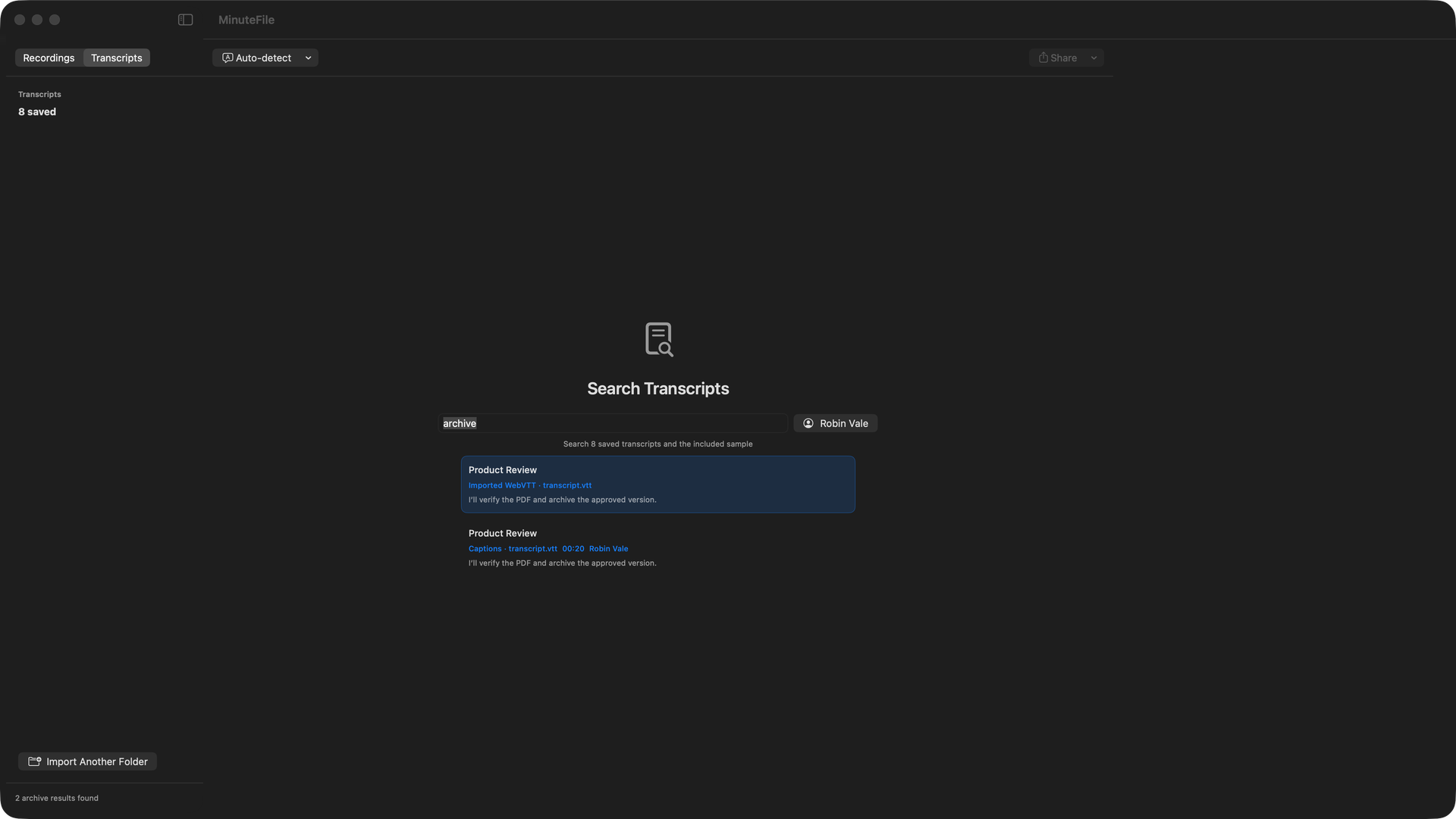
The Person filter is not automatic speaker identity. Search does not generate an answer, summary, topic cluster, or list of action items. Use a cloud meeting assistant when those jobs matter more than keeping and correcting the transcript archive on one Mac.
Keep the transcript useful when media goes missing
MinuteFile treats the transcript as the saved record. If referenced audio or video disappears later, a readable transcript remains readable, editable, searchable, and exportable. Playback and retranscription still need usable media.
MinuteFile 0.1.9/build 10 adds Archive Health for a read-only inspection of saved transcript records and their referenced playback media. It reports:
- the number of transcript records, including readable and invalid records;
- whether at least one referenced media source is reachable for playback;
- which readable records have missing referenced media; and
- storage used by the MinuteFile archive, installed transcription models, and speaker models, without counting source recordings stored elsewhere.
The inspection does not repair or change archive files. From the results, I can open a readable transcript, reveal reachable media, explicitly locate replacement media for a missing reference, or reveal an invalid transcript record in Finder. Choosing replacement media is a separate action that updates the saved reference; Archive Health does not find or repair it automatically.
An invalid transcript record is not recovered by the inspection. MinuteFile leaves it unchanged so I can inspect it in Finder or restore it from my own backup.
Back up the archive and source recordings separately
I keep the original meeting folders and exported transcript copies in my normal backup system. MinuteFile can export TXT, Markdown, and HTML, but an app archive should not be the only copy of a recording or transcript I need to retain.
Local handling also does not change recording consent, confidentiality, retention, or copyright rules. I only keep and process meetings I am allowed to retain.
The MinuteFile privacy page documents the network boundary. Once the required models are installed, recording import, transcription, correction, People, literal search, and export do not send recordings or transcripts to a MotionObj service. Optional model downloads, signed update checks and downloads, and Stripe checkout still use the network.
MinuteFile includes a trial covering three full transcriptions. Existing transcript intake does not consume a trial transcription. A US$39 perpetual licence, paid once, unlocks further transcription and retranscription in the current app.
MinuteFile facts verified August 4, 2026, against version 0.1.9/build 10, its release notes, appcast, product page, privacy page, and the shipped source for the same build.
Try MinuteFile on three recordings free or inspect the complete MinuteFile workflow. A perpetual licence costs US$39 paid once.