A Fathom AI alternative for meetings you already recorded
Keep Fathom AI if you need to capture Zoom, Google Meet, or Microsoft Teams calls and turn them into summaries, action items, searchable cloud meeting knowledge, or CRM and team workflows. Try MinuteFile when the meeting is over and its recording or transcript is already on your Mac.
I make MinuteFile for Mac. MinuteFile does not replace Fathom’s live capture, meeting bot, summaries, action items, CRM sync, or collaboration. Automatic transcription can be wrong in either workflow, so I check important names and decisions against the recording.
Fathom workflow, platform, privacy, export, and pricing facts verified August 1, 2026, from the Fathom pricing page, capture-mode documentation, external-recording documentation, and Fathom Privacy Policy. MinuteFile facts verified against version 0.1.8 and its privacy page on the same date.
Is the meeting still happening, or is the recording already complete?
Fathom is capture-first. Its established workflow joins supported video meetings as a visible bot. A newer Fathom experience adds bot-free transcript-only and audio-only modes, but the current rollout documentation limits that beta to Mac users with English-language meetings. Both routes begin while a meeting is happening.
MinuteFile is archive-afterward. It opens completed recording folders and existing VTT, SRT, timestamped-text, or plain-TXT transcripts on a Mac. It does not join or listen to a meeting.
Fathom’s current help center says external recordings cannot be uploaded for analysis. That makes the decision fairly simple when an MP4, M4A, WAV, or transcript is already sitting on the Mac: Fathom’s documented workflow does not start there, while MinuteFile’s does.
| Workflow question | Fathom AI | MinuteFile 0.1.8 |
|---|---|---|
| When does it start? | During a supported Zoom, Google Meet, or Microsoft Teams call | After capture, from a completed recording folder or supported existing transcript on a Mac |
| How does it capture? | A meeting bot, or phased bot-free transcript-only and audio-only modes for eligible Mac/English users | No live capture or meeting bot |
| Where is the working record? | In a Fathom account with cloud recordings, transcripts, summaries, search, sharing, and connected services | Recording references, saved transcripts, People, bookmarks, and literal search stay on the Mac |
| What does it produce? | A transcript plus plan- and mode-dependent recording, summary, action items, Ask Fathom, clips, and collaboration | A correctable transcript record with manual People, honest Split Turn, bookmarks, literal search, playback, and TXT, Markdown, or HTML export |
| What does it cost? | Free individual plan; paid individual, team, business, and enterprise plans add AI, team, CRM, and administration features | Three-recording transcription trial; US$39 perpetual licence paid once |
Fathom fits meetings that still need capture and notes
Fathom supports Zoom, Google Meet, and Microsoft Teams. Its current pricing page lists desktop apps for Mac and Windows, a Chrome extension for Google Meet, and a Zoom app. The newer beta offers three explicit capture choices: transcript only without saving a recording, local audio capture without video, or full audio and video through a bot.
Bot-free does not mean invisible. Fathom documents a meeting-chat recording notice or in-app consent prompts, and says there is no silent-recording path. The older workflow also keeps the bot visible in the participant list. Recording consent remains the user’s responsibility in either product.
After capture, Fathom can generate summaries and action items. Its pricing page also lists attendee and keyword search, Ask Fathom within one call, account-wide Ask Fathom, recording downloads, clips, playlists, and plan-dependent search across team meetings. Fathom’s service is useful when those outputs should be ready as soon as the call ends.
MinuteFile does not generate a summary, identify action items, answer questions, make clips, or search semantically across meetings. Its search is literal text matching over saved local transcripts, optionally narrowed by a Person I assigned myself.
Fathom’s archive belongs to its account and cloud workflow
Fathom’s Privacy Policy defines meeting content as notes, recordings, audio, video, transcripts, attendee names and emails, and calendar information that Fathom receives or creates through the service. Registration connects through Google, Microsoft, or SSO, and the policy says a Google or Outlook calendar connection is core to using the service.
The current plans include unlimited recording storage and transcription. Calls can be shared at several access levels, and Team folders can organize full recordings, transcripts, and summaries. Fathom also supports comments, mentions, team meeting views, CRM sync, and additional administration on paid plans.
That is a useful cloud meeting system. It is not the same job as keeping the working transcript archive on one Mac. MinuteFile has no account, backend, cloud transcription API, shared workspace, or CRM connection. It still uses the network for optional model downloads, signed update checks and downloads, and Stripe Checkout, so I do not describe it as blanket offline.
MinuteFile starts with a recording or transcript you already have
My MinuteFile workflow is deliberately after the fact:
- Put each completed meeting, interview, or call recording in its own folder on the Mac.
- Open that folder in MinuteFile, or let an optional watched folder add stable recordings to the inbox.
- Install a transcription model, then start a local transcription manually. Automatic watched-folder transcription stays off until I explicitly choose a model and language for that folder.
- Correct the transcript text and meeting-only speaker labels while checking the original recording.
- Manually assign reusable People only when I know who spoke.
- Bookmark passages, save the transcript, and use literal archive search later.
MinuteFile also accepts existing VTT, SRT, timestamped-text, and TXT transcripts. A transcript copied from Fathom can be saved as a text file and brought into MinuteFile without pretending there is a direct integration. Fathom’s current documentation says its transcript is copied to the clipboard rather than downloaded directly.
If the media disappears later, MinuteFile keeps an imported or generated transcript readable, editable, searchable, and exportable. Playback and retranscription still require the recording. That transcript-first behavior is useful when the durable artifact is the text rather than a cloud call page.
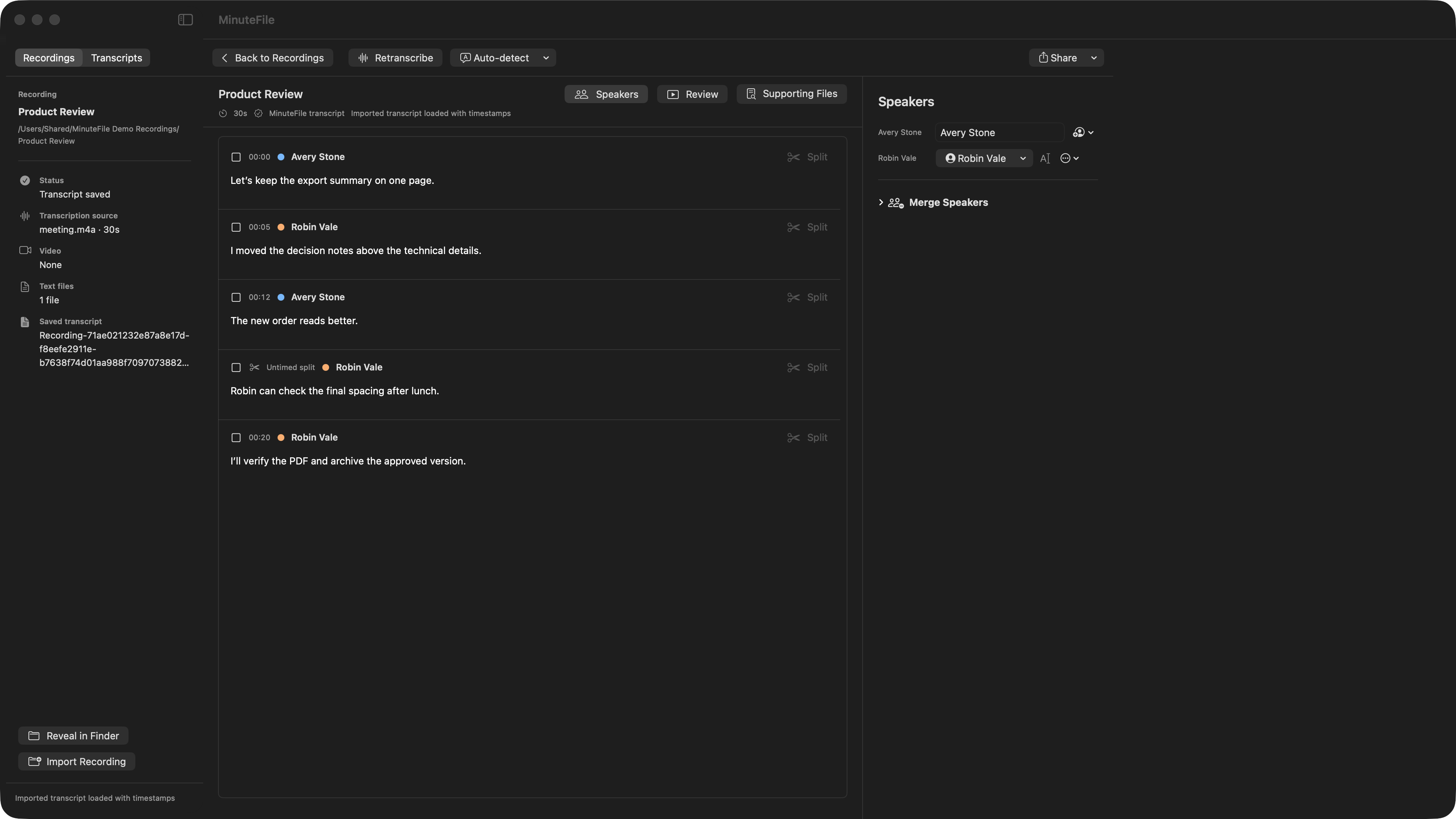
The completed Zoom recording workflow covers one meeting folder from import through correction and search. If I need both completed-file import and a cloud meeting library, my Otter.ai comparison covers that different overlap. The local-versus-network checklist explains MinuteFile’s own network boundaries.
Speaker labels are not automatic identity in MinuteFile
MinuteFile keeps the label found in one transcript until I edit it. I can then assign a reusable Person manually and use that Person to filter later literal searches. MinuteFile does not learn the voice or automatically recognize that Person in another recording.
Fathom’s Privacy Policy includes speaker identification in the meeting content its service receives. Account owners with the right access can also edit transcripts. The first-party pages I reviewed did not define how speaker identity is assigned or carried across calls, so I treat that behavior as unknown. I do not claim that MinuteFile matches it or that either approach is more accurate.
MinuteFile’s Split Turn also stays literal. When one transcript block contains two speakers, the first block keeps its timestamp and the new block becomes untimed. The app does not invent another timestamp or guess the second speaker.
Fathom connects meeting output to teams and CRMs
Fathom’s Team plan adds team-wide search, recordings, folders, comments, mentions, and keyword alerts. Business adds CRM field sync, Deal View, coaching metrics, AI scorecards, and advanced or custom summaries. Current first-party documentation shows HubSpot and Salesforce workflows that can write summaries, action items, and meeting context into CRM records.
MinuteFile has no team workspace, account permissions, comments, alerts, CRM sync, calendar link, public API, or automation service. It exports TXT, Markdown, and HTML copies from the Mac. Fathom recordings can be downloaded as MP4, while transcript text is copied to the clipboard; availability can depend on ownership and sharing access.
Choose Fathom when the meeting record needs to move through a sales, customer-success, coaching, or shared-team process. Choose MinuteFile when the recording already exists and the job is to correct and retain a local transcript archive yourself.
Fathom plans pay for capture, AI, and team workflow
Fathom currently lists these plan shapes:
- Free: US$0, unlimited recordings, transcription, and storage. Current help documentation says five calls each month receive advanced summaries and AI features before the free limits apply.
- Premium: US$20 per user monthly, or US$16 per user per month billed annually, adding advanced summaries, generated action items, Ask Fathom, and bot customization.
- Team: US$19 per user monthly, or US$15 per user per month billed annually, with a two-user minimum and team search, recordings, folders, comments, and alerts.
- Business: US$34 per user monthly, or US$25 per user per month billed annually, with a two-user minimum and CRM field sync, Deal View, coaching metrics, and AI scorecards.
- Enterprise: custom pricing with additional onboarding, provisioning, security, retention, and support controls.
Fathom’s public pricing and help pages both say transcription is unlimited. The pricing text I reviewed does not give a language count, while the current individual-plan help page says 38. I leave the count out of the comparison because Fathom’s plan presentation can change. Prices, beta availability, plan limits, and features can change too.
MinuteFile’s trial transcribes three recordings. The US$39 perpetual licence unlocks further local transcription and retranscription in the current app. It does not buy a hosted service, future major versions, live capture, summaries, cloud storage, or team collaboration.
MinuteFile is not a replacement for Fathom’s meeting service
Keep Fathom when any of these are part of the job:
- capturing a live Zoom, Google Meet, or Microsoft Teams call;
- a meeting bot or eligible bot-free capture;
- immediate summaries, action items, follow-up emails, clips, or Ask Fathom;
- account-wide or team-wide cloud meeting search;
- automatic sharing, folders, comments, mentions, alerts, or access controls;
- CRM sync, Deal View, coaching, scorecards, integrations, or an API;
- unlimited hosted recording, transcription, and storage under Fathom’s current plans.
MinuteFile fits after capture, when completed recordings or existing transcripts are already on the Mac and the work is correction plus a local searchable archive. Its current public transcription controls are Auto-detect, English, and Chinese. I do not claim live capture, automatic identity, summaries, collaboration, accuracy, language, cloud, or traction parity with Fathom.
Primary Fathom sources
- Fathom plans, pricing, capture choices, AI, search, collaboration, CRM, and administration
- Bot-free beta eligibility, capture modes, consent, and post-meeting behavior
- Recording visibility and consent
- External recording uploads are not supported
- Free and Premium recording, transcription, summaries, AI, and integration limits
- Copying a transcript
- Downloading a recording
- Sharing call recordings and access levels
- Team folders
- Salesforce integration
- Fathom Privacy Policy
Try MinuteFile on three recordings free or inspect the complete MinuteFile workflow. A perpetual licence costs US$39 paid once.